Stop subsidizing your projects out of your own margin.
See what each job is really costing — before the month closes.
See every line before it goes over.
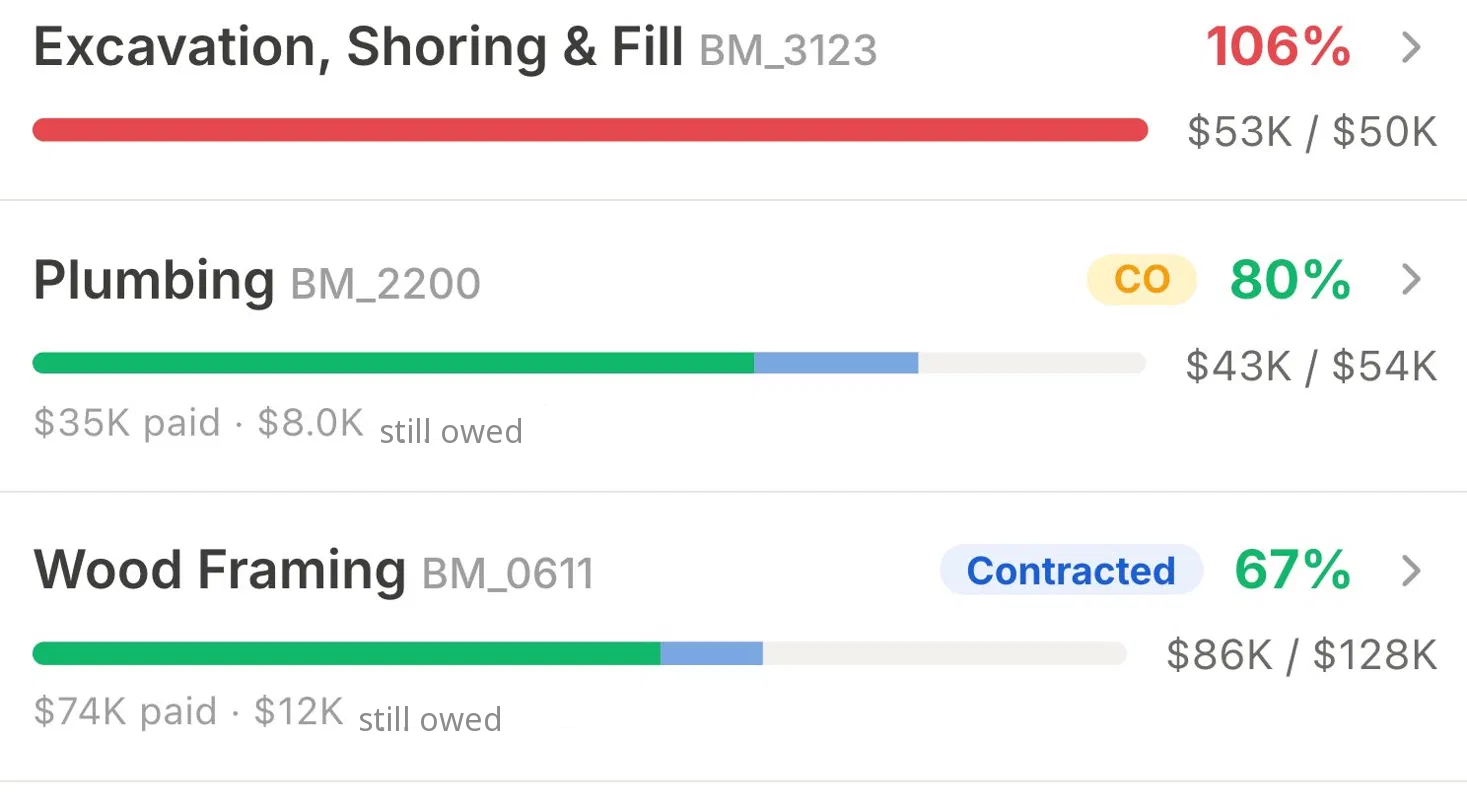
Illustration with fictional Demo Workspace data.
Start for free
Pay nothing, and find the money your jobs are quietly losing — the complete tool, unlimited users, no credit card.
The complete tool — unlimited users, no per-seat fees, nothing held back.
Platinum
CA$588.00/year — yours free right now
The complete tool, free — for builders and trades who want their real cost picture before paying for anything.
Enterprise
Talk to us about your team's needs.
For high-volume residential developers and custom-home builders running many projects.
Contact SalesNo payment method is collected and nothing is charged. Create an account, activate your plan, and start tracking costs.
On a management fee? Show owners real-time costs and reconcile without the back-and-forth. Fixed-price? Watch your direct costs before an overrun eats the margin you quoted.
Everything below is included, free
You get the complete tool from day one — every capability below, with unlimited users. Nothing is held back behind a paid tier.
Capture & Categorize
Capture every cost the moment it happens — and categorize it right.
- Snap-a-receipt AI capture — photograph any invoice, e-transfer, or cash receipt; AI reads vendor, amount, and tax in seconds.
- Automatic cost-code mapping — every expense coded to the right budget line using standard construction cost codes.
- Multi-party capture — crew, office, and invited suppliers submit receipts and invoices the moment they spend.
- Reimbursements & refunds — track crew out-of-pocket spend and supplier refunds to the right project and line.
Cost & budget control
See what you've paid and what you still owe the moment it moves — catch overruns before you pay.
- Real-time cost picture — on each project, what you've paid and what you still owe on one live budget bar, per cost line.
- Per-line budget health & overrun alerts — green/amber/red the moment a line crosses its limit, before month-end.
- Approve-with-impact — see a receipt's effect on the line and the project's real cost picture as you approve it.
- Cost dashboard — per-project KPIs and a cash-flow view of what you still owe in one place.
Vendor & payments
Match invoices to payments and keep vendor history across jobs.
- Invoice-to-payment matching — link every invoice to its payment; see what's paid and what's still outstanding.
- Bank reconciliation — match payments against your bank statement so records tie out.
- Cross-project vendor tracking — one profile per vendor across all your projects; history and pricing follow you job to job.
Team & access
Invite anyone, control what they see, and keep a full audit trail.
- Flexible access by module — invite anyone; grant each person the right level (some only drop receipts, others approve and see the full picture).
- Cross-project audit log — searchable record of who changed what across every project; edits require a reason.
Books-ready handoff
One-tap structured export your accountant can use.
- Bookkeeping-ready export — one-tap structured CSV that imports into mainstream accounting software, so your accountant gets clean data.
Every capability above is included, at no cost. Your plan is limited only by how many projects you run at once — never by features.
Your plan counts the projects you're actually running
Your plan covers a set number of active projects at a time — the jobs you're actually working on. Finish a job and archive it, and that slot frees up automatically. Archived projects are set aside and fully kept — they don't count toward your plan. Reactivate one anytime to pick up exactly where you left off; only active projects count.
- · Active = you're writing to it
- · Archived = set aside & fully kept, frees the slot
- · Reactivate later = counts again
BuildMind isn't another expense. It's where the leaks stop.
Caught early, not at month-end
See a line going over before you pay it, not weeks later when the books are pulled together.
Nothing fades in the glovebox
Receipts are captured and audit-ready the moment they're snapped, coded and traceable. (Tax outcomes are between you and your accountant — this keeps the paper trail clean.)
Less back-and-forth
Crew, office, and suppliers all drop costs in one place, so the 'did you send me that receipt' chase disappears.
Run your own numbers.
Fill in your numbers to see a range.
Built for sensitive project data
How BuildMind handles your project and financial data.
See our Privacy Policy and Terms of Service for full details.
Frequently asked questions
How much does BuildMind cost?
Nothing right now. Platinum normally runs CA$588.00/year, and we're giving it away free — the complete tool, with unlimited users and no per-seat fees. It covers up to 6 active projects. There's no credit card, no trial clock, and nothing to cancel. Enterprise stays a custom plan arranged with sales.
Do I need a credit card?
No. Creating an account and using your plan takes no payment method at all — we never ask for card details, and you're never charged.
Does adding users or my crew cost more?
No. Unlimited users are included with no per-seat fees — crew, office, and invited suppliers all included. Nothing about BuildMind is priced by headcount.
What counts as an active project?
A project you're writing to this month — adding receipts, budgets, or vendors. Archive a finished job and its slot frees up; reactivate it anytime to pick it back up.
How does tracking what you've paid and still owe protect my profit?
Most tools only tell you what you've already paid. BuildMind shows you what you've paid and what you still owe (AP). The moment an invoice lands — even unpaid — that budget line updates. You know how much is already spoken for before it leaves your bank account.
What's the catch?
There isn't one. Platinum is the complete tool — no feature is held back, no card is collected, and nothing converts to a paid plan behind your back. It's listed at CA$588.00/year, and that's what it's worth — you're just not paying it today. If that changes, you'll hear it from us before anything is charged.
Can I export my data?
Yes — anytime. One tap gives you a clean, structured CSV that imports into mainstream accounting software. You can also export the original invoice files automatically renamed to a consistent date_amount_vendor_invoice# format — so the pile of mismatched 'scan001.pdf' files your suppliers send becomes a clean, searchable record with no manual renaming. No lock-in.
Can my crew on-site actually use this without breaking anything?
Yes. If they can text a photo, they can use BuildMind. They snap the receipt on site and the AI does the extraction and coding. You keep full control — nothing touches your budget until you approve it.
Will BuildMind keep my receipts audit-ready?
Yes — receipts are stored digitally and traceable, so your records stay audit-ready. (This isn't tax advice; confirm filings with your accountant.)
Does BuildMind integrate directly with QuickBooks, Xero, or Sage?
No. BuildMind has no two-way sync, direct import, or live connection to any accounting system. Data leaves BuildMind as a structured CSV export that imports into mainstream accounting software.
Does BuildMind connect to my bank?
No. There is no bank feed and no automatic transaction import. You match a payment against your bank statement and mark it cleared yourself inside the app.
Is there a client or owner portal?
No separate portal. Owners and developers who need visibility are invited into the project itself, with access controlled at the module level, so they see what has been approved and what is still outstanding without a second login to manage.
Is there an Android app or a web app?
Project and cost work happens in the BuildMind iOS app. There is no Android app today. The website is where you create an account and manage it — it is not a working dashboard.
Does BuildMind include scheduling, site logs, safety checklists, or estimating?
No. BuildMind is a job-costing tool, not a full construction management suite and not an accounting system. It does not include scheduling or Gantt charts, daily site logs or field reports, safety or inspection checklists, change order management, or estimating, takeoff, and bidding.
What if I need more than the plan covers?
Running more jobs than your plan covers, or need something tailored? Reach our team via Contact Sales — we'll tailor projects, users, and optional private deployment to your needs.
Know your real number — while you can still do something about it.
All names, companies, projects, and figures shown in product images and examples are fictional and for illustration only. Any resemblance to real people or businesses is coincidental.